KitGuru KitGuru.net – Tech News | Hardware News | Hardware Reviews | IOS | Mobile | Gaming | Graphics Cards


We use the Open Source Response Time Tool (OSRTT), developed by TechTeamGB, for our response time testing. This measures grey-to-grey response times and presents the results in a series of heatmaps, the style of which you may be familiar with from other reviews.
Initial Response Time is the time taken for the panel to transition from one colour to another, where lower values are better. We present the initial response time, so overshoot is not taken into account and is measured separately. We use a fixed RGB 5 tolerance for each transition.
Overshoot is the term given for when a monitor's transition exceeds or goes beyond its target value. So if a monitor was meant to transition from RGB 0 to RGB 55, but it hits RGB 60 before settling back down at RGB 55, that is overshoot. This is presented as RGB values in the heatmaps – i.e. how many RGB values past the intended target were measured.
Visual Response Rating is a metric designed to ‘score' a panel's visual performance, incorporating both response times and overdrive. Fast response times with little to no overshoot will score well, while slow response times or those with significant overshoot will score poorly.
OD Modes
As we have come to expect from AOC displays, there are four different overdrive modes – Normal, Fast, Faster and Fastest.
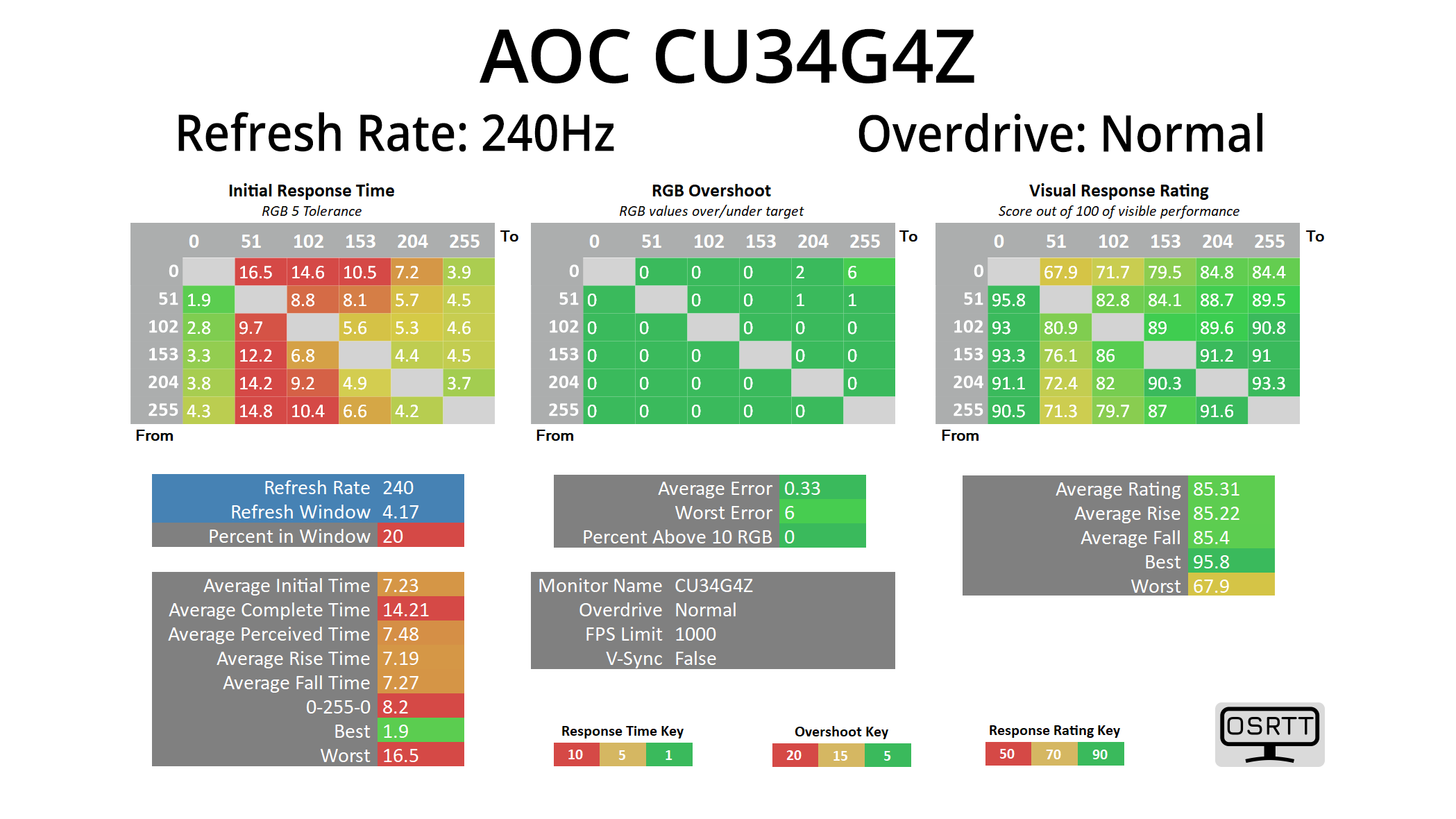
Starting off with the Normal mode at 240Hz, it isn’t actually that slow for what is effectively no overdrive being applied, with its average of 7.23ms, so that bodes well for the other modes.
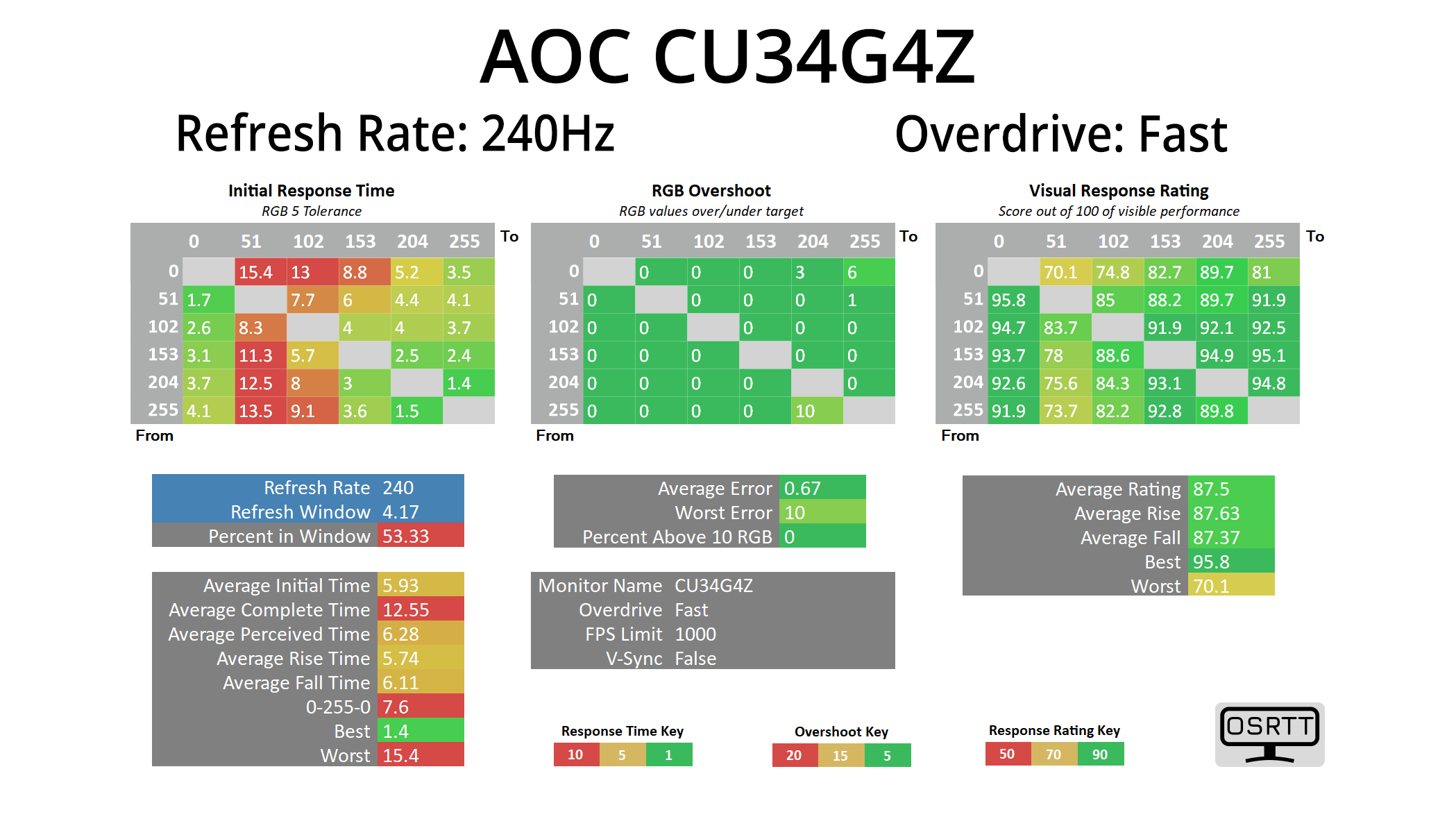
Fast is indeed faster, as we’d expect, increasing the average response time to 5.93ms while there’s still no overshoot of any significance.

Faster takes things up a level, this time delivering an average response of 4.23ms. There are still a handful of slower transitions, particularly the fall times from RGB 255 which we’d expect from a budget VA, as this indicates some dark-level smearing, while a couple of rise times from RGB 0 (being a black screen) are also quite slow. But overall, for a VA at this price point, the results are very good indeed.
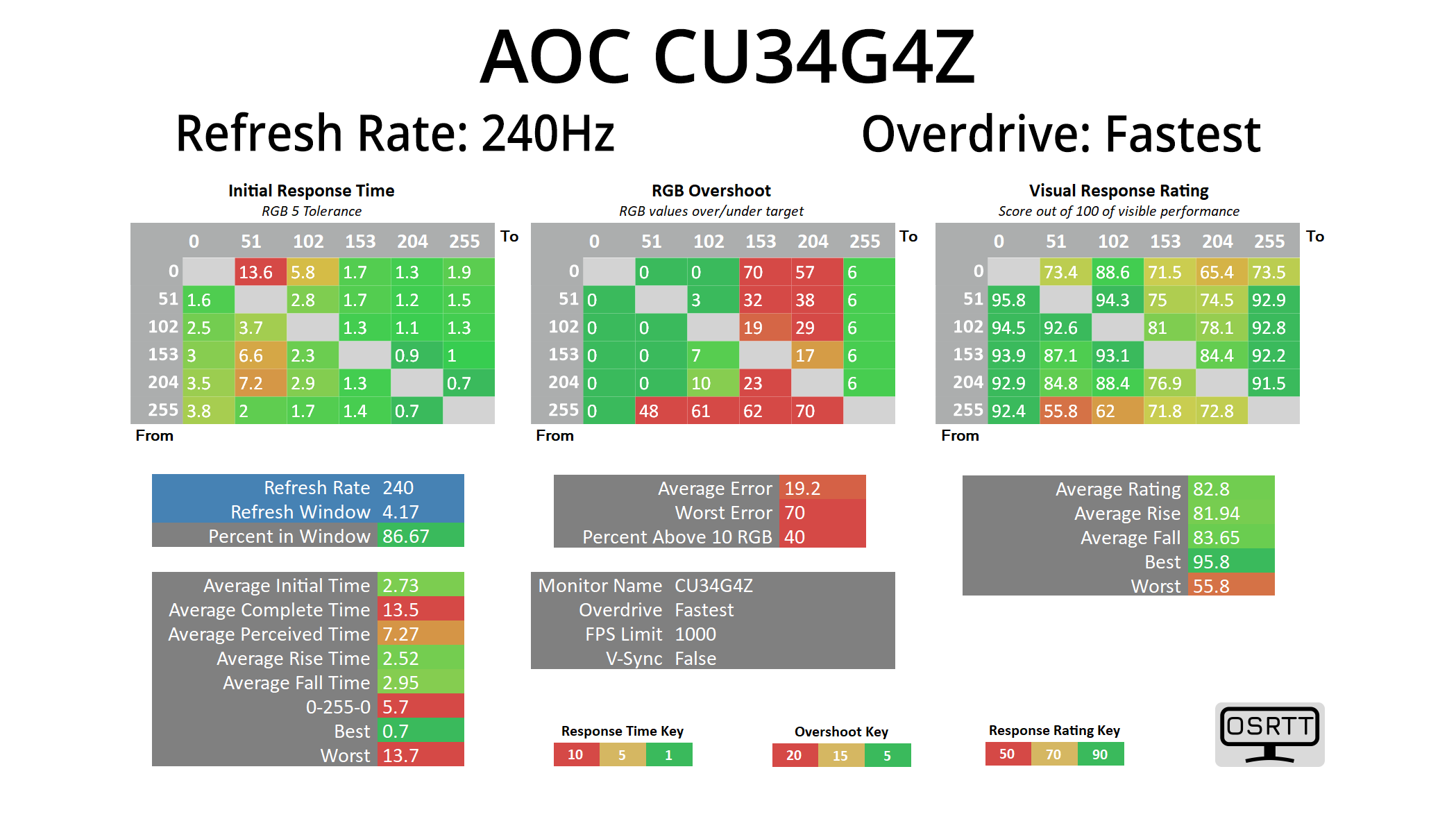
There is also the Fastest mode which speeds things up even more, now delivering an average response time of 2.73ms, though it does add in a fair bit of overshoot – though as we will see shortly, it wasn’t actually that bad, but I’d still stick to the Faster mode personally.
Variable Overdrive


Having established that the Faster mode is the most optimal choice, it’s also good to see that AOC has indeed implemented variable overdrive. This means as the refresh rate lowers, the overdrive eases off, as we can see from the results at 120Hz and 60Hz. If this wasn’t implemented, you’d get more and more overshoot at lower refresh rates which would mean manually adjust the overdrive mode depending on the frame rate you get – but that isn’t needed here, and that is always a good thing.

Just to confirm the overall performance then, the CU34G4Z is one of the faster LCDs we have tested in the last couple of years – not bad going considering it’s a budget VA panel! Notably it’s a good millisecond or-so faster than the iiyama GCB3486WQSCP that I reviewed in August, a similarly-specced ultrawide that costs around £350.
Motion clarity
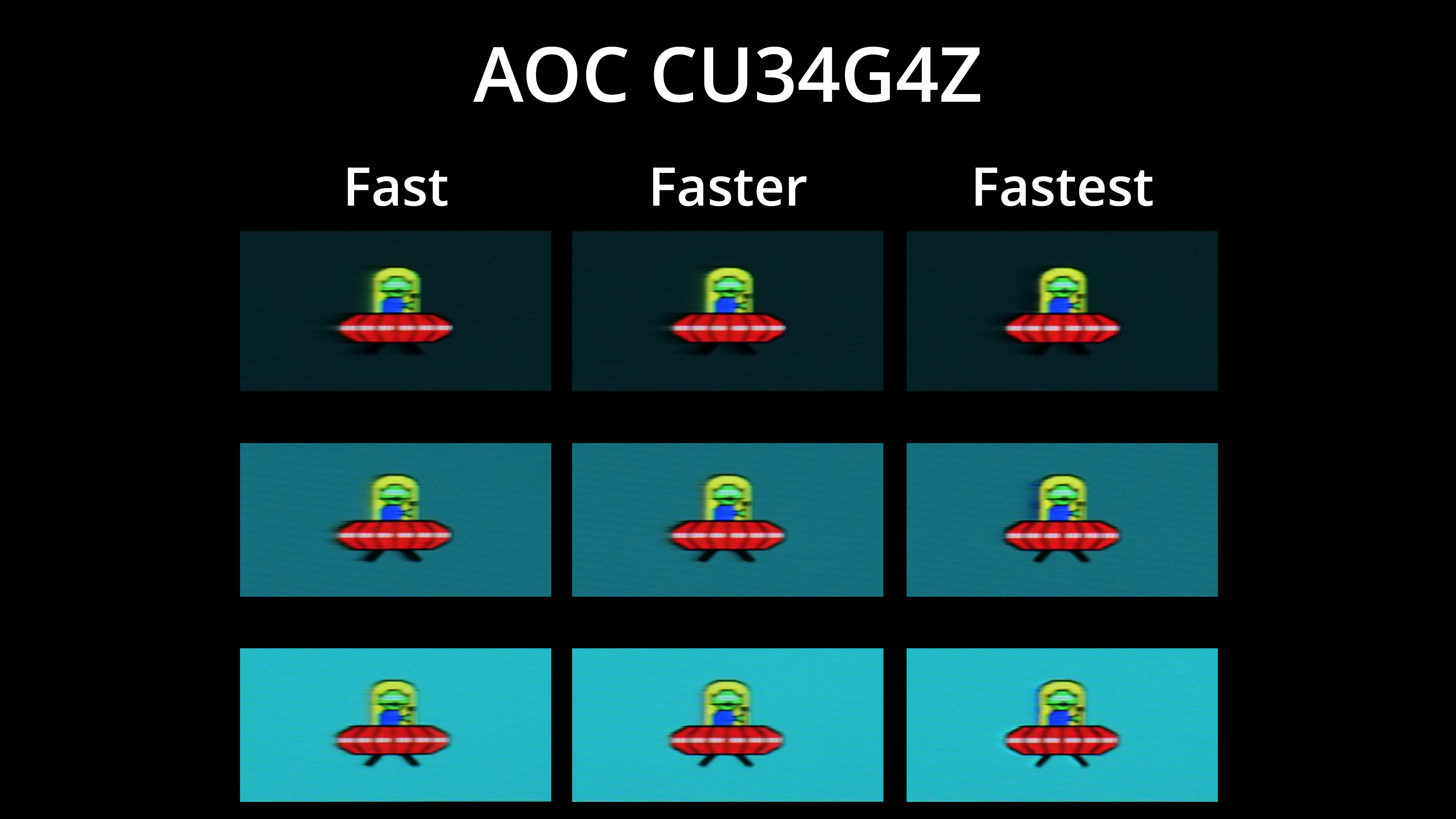
For a visual example we are using the BlurBusters UFO test, and I’ve compared the Fast, Faster and Fastest overdrive modes. Fastest isn’t actually too bad as we mentioned, but you can see the blue overshoot that isn’t there on the Faster mode. General motion clarity is pretty good though, certainly better than I was expecting at this price.

In fact, it’s even better than the iiyama GCB3486WQSCP, despite the spec being basically identical. There’s less dark-level smearing, too, though if we compare against the Philips 27M2N3501PA, a budget 260Hz IPS panel, we can see there is still some dark-level smearing with the CU34G4Z, but it’s not nearly as much of a problem as it has been in the past for cheaper VA panels.
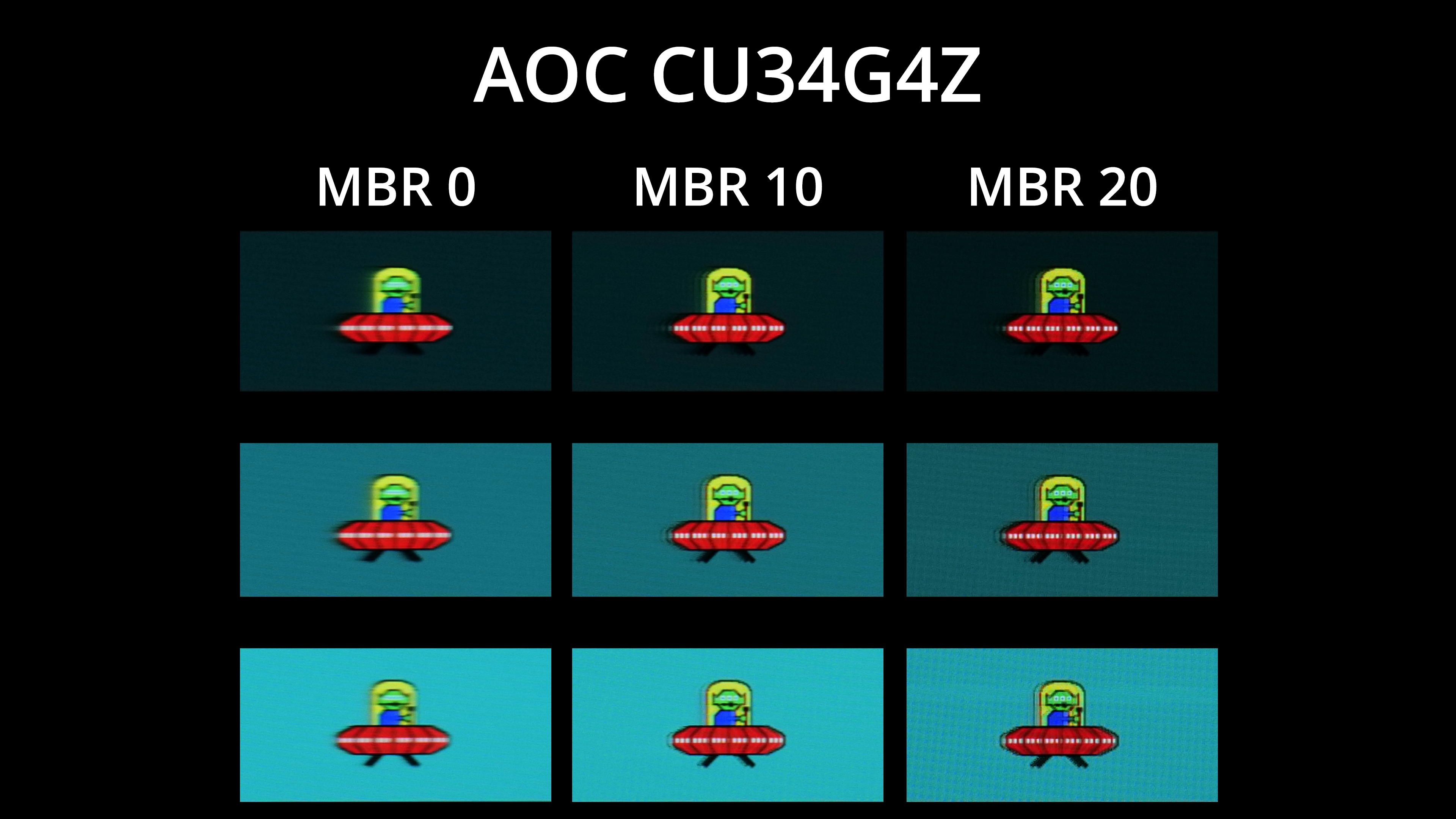
AOC does also offer a backlight strobing mode, called MBR, though this is not MBR Sync, so you have to disable adaptive sync for it to show up. You can configure it from 0 to 20, with 20 being the strongest, though brightness does dim as you turn MBR up – we saw 372 nits with MBR off, then a reduction to 258 nits with MBR 10, while MBR 20 hits just 76 nits. Still, you can see a good boost to overall motion clarity and there’s only a small amount of signal crosstalk at MBR 10, so if you don’t mind losing adaptive sync functionality, it works pretty well.